> For the complete documentation index, see [llms.txt](https://clanker.gitbook.io/documentation/llms.txt). Markdown versions of documentation pages are available by appending `.md` to page URLs; this page is available as [Markdown](https://clanker.gitbook.io/documentation/resources/faq.md).
# FAQ
The questions below cover Clanker tokens, fees, rewards and Farcaster accounts.
## Clanker v5
What is a v5 token?
Clanker v5 is the current version of Clanker, live on Base, BNB Chain, Monad, Robinhood Chain, X Layer, Arc and Elysium. A v5 token has no LP fee. Instead, every trade pays a buy tax or a sell tax, each between 1% and 10%. The tax pays Clanker's fee and the creator's rewards, and the creator can also send part of it to holder dividends, a token burn or an integrator. See [Token Deployments](/documentation/tokens/token-deployments.md) and [Creator Rewards & Fees](/documentation/tokens/creator-rewards-and-fees.md).
How much does Clanker take from a v5 token's tax?
Clanker takes the larger of 10% of the tax and 0.5% of the trade, and at most 1% of the trade. At a 5% tax, Clanker takes 0.5% of the trade and the creator's side gets 4.5%. If the sniper fee is on, trades in the first 20 seconds after launch also pay a sniper fee, which goes to Clanker. See [Creator Rewards & Fees](/documentation/tokens/creator-rewards-and-fees.md).
How do holder dividends work?
If a v5 token pays dividends, part of every trade's tax goes to holders who hold at least the token's minimum balance (at least 10,000 tokens). Dividends are paid in the pair token, ETH or USDC. Holders claim on clanker.world from the token page or from their profile, where **Claim all** claims many tokens in one transaction. See [Holder Dividends](/documentation/tokens/holder-dividends.md).
How do token burns work?
If a v5 token has a burn share, part of every trade's tax is taken in the token and added to a pending burn. Any wallet can send it to the dead address with **Burn now** on the token page. See [Token Burns](/documentation/tokens/token-burns.md).
## Tokens and networks
Which chains does Clanker support?
Clanker v5 runs on Base, BNB Chain, Monad, Robinhood Chain, X Layer, Arc and Elysium. Clanker no longer supports Ethereum, Arbitrum One, Unichain, Abstract or Solana. clanker.world hides tokens on these chains: they are left out of its lists, search and API, and their token pages return 404. The Ethereum, Arbitrum One and Unichain contracts stay listed for tokens launched there before. See [Deployed Contracts](/documentation/references/deployed-contracts.md) for every chain and contract.
How can I find the token page for a Clanker token that I deployed?
On [clanker.world](https://www.clanker.world/):
1. Search the [token list](https://www.clanker.world/clankers) by token name, ticker or the creator's Farcaster username.
2. Or connect your wallet, open your [profile](https://www.clanker.world/profile) and select **View my tokens** in the **My tokens** card.
## Creator rewards
How do I claim creator rewards?
Open the token's Admin page, `https://www.clanker.world/clanker/TOKEN_CONTRACT_ADDRESS_HERE/admin`, connect the reward recipient's wallet and claim in the **Claim Rewards** card.
* **v5**: a claim pays the recipient's whole FeeEscrow balance across its v5 tokens (see [Unclaimed Rewards Balance](/documentation/tokens/unclaimed-rewards-balance.md)). A past recipient claims from the **Tax Fees** card on its [clanker.world profile](https://www.clanker.world/profile).
* **v4**: rewards wait in the fee locker, and the token side and the pair side are claimed separately. On clanker.world the claim buttons show only to the reward recipient's wallet, unless that recipient turned on letting any wallet claim.
* **v2, v3 and v3.1**: anyone can start the claim, and the rewards always go to the reward recipient, not to the wallet that started it.
* **v1, and v0 tokens with their own locker**: only the token's creator can claim.
See [Managing a Token](/documentation/tokens/managing-a-token.md) for everything else the Admin page does.
What does the creator earnings card on the clanker.world token page show?
The card, titled **Fees Available to Claim**, shows each reward recipient's unclaimed rewards in the pair token, read live from the chain, for v5 tokens and for v4 tokens on Base. A v5 balance includes the rewards of every v5 token that pays that wallet.
How can I check the balance of unclaimed rewards for a token?
* **v5 and v4**: select **Check Claimable Fees** in the **Claim Rewards** card on the token's Admin page. For v5, `GET /api/creator-earnings/{tokenAddress}` returns the FeeEscrow balances of all current recipients.
* **v3.1 and earlier**: check the **Uncollected fees** of the token's initial Uniswap v3 position on chain.
See [Unclaimed Rewards Balance](/documentation/tokens/unclaimed-rewards-balance.md).
Why is my unclaimed rewards balance lower than expected?
* **v5**: one FeeEscrow claim pays the rewards of all your v5 tokens, so claiming on one token also clears the balance shown on your other v5 tokens.
* **v2 to v4**: the contracts let anyone start the payout of creator rewards, so you may already have received rewards without claiming them yourself.
How can I determine the wallet address that creator rewards will be sent to?
The token's Admin page lists each reward recipient, its admin and its share under **Current Rewards Info** (v4 and v5). A reward admin can change its recipient with **Update reward recipient**.
For tokens created by replying to @clanker on Farcaster, the first reward recipient is:
1. your latest Farcaster verified address, or
2. your Farcaster custody address, if you have no verified address.
To find these addresses, see [How do I find my Farcaster verified address / custody address / FID?](#how-do-i-find-my-farcaster-verified-address-custody-address-fid)
How do I claim rewards for a token deployed from X and move smart wallet balances to another account?
Watch the walkthrough video:
## Farcaster accounts
How do I find my Farcaster verified address / custody address / FID?
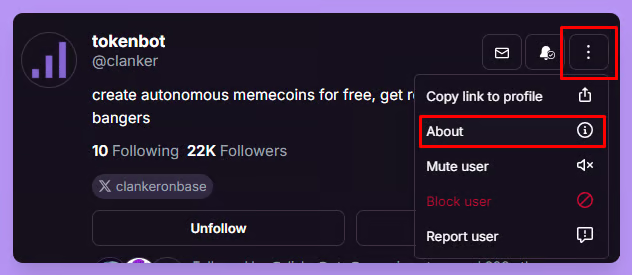
1. In the Farcaster app on desktop, go to your **Profile**, press the vertical ellipsis button on the top right and select **About**. On mobile, select the **Information** icon on the top right of your **Profile**.
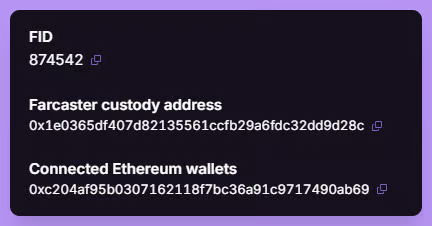
2. If you have connected an Ethereum wallet, your verified address is the bottom one in the list of **Connected Ethereum Wallets**. In the example below, only one wallet is connected, so that is the verified address.