> For the complete documentation index, see [llms.txt](https://clanker.gitbook.io/documentation/llms.txt). Markdown versions of documentation pages are available by appending `.md` to page URLs; this page is available as [Markdown](https://clanker.gitbook.io/documentation/general/faq.md).
# FAQ
### Token Deployments
What networks / chains does Clanker support?
Please see [Deployed Contracts](/documentation/references/deployed-contracts.md) for a full list of contract deployments.
How can I find the Token Info page for a Clanker token that I deployed?
There are a handful of ways that you can find the Token Info page of Clanker tokens that you've deployed.
**Via desktop**
On the [Clanker token homepage](https://www.clanker.world/clanker), you can:
1. Search for tokens by token name, ticker, or Farcaster username of the creator.
2. Use the `Connect` button on the bottom left of the page to connect the wallet of your verified address, then press `my deployed clankers`.
3. Visit the [deployed by FID](https://www.clanker.world/clanker/deployed-by-fid) page and type in your FID. See [#how-do-i-find-my-farcaster-verified-address-custody-address-fid](#how-do-i-find-my-farcaster-verified-address-custody-address-fid "mention") for guidance on finding your FID.
**Via Warpcast mobile**
You can click on any frame that Clanker responds with (go to `Casts + Replies` of @clanker) and select your profile on the bottom left. Press `my deployed clankers` to view a list of all Clanker tokens you have created.
### Creator Rewards
How do I claim creator rewards?
Visit the token admin page `https://www.clanker.world/clanker/[TOKEN CONTRACT ADDRESS]/admin` , connect a wallet, and select `Claim Rewards`. This will prompt you to execute a transaction that will distribute creator rewards.
{% hint style="info" %}
Anyone can initiate the claim process for any token. Creator rewards will then be distributed to the token creator - not the wallet initiating the claim process.
{% endhint %}
What does Creator Earnings on the clanker.world Token Info page mean?
The Creator Earnings figure is an estimate of the total rewards that a token creator has accrued in the past 30 days. Please note that this is only an **estimate** and might not accurately reflect the current market value of the tokens included in creator rewards.
Unclaimed rewards represent the current balance of unclaimed rewards, not a 30 day estimate.
How can I check the balance of unclaimed rewards for a token?
Visit the bottom of the token info page to see an estimate of unclaimed rewards.
Why is my unclaimed rewards balance lower than expected?
Anyone can initiate the payout of creator rewards, so you might have already received creator rewards for tokens you deployed even without claiming the rewards yourself.
How can I determine the wallet address that creator rewards will be sent to?
For tokens created directly through interaction with the @clanker bot on Farcaster, the address set as the initial recipient for creator rewards is either:
1. Your latest Farcaster verified address
2. Your Farcaster custody address (if you do not have any Farcaster verified addresses)
See [#how-do-i-find-my-farcaster-verified-address-custody-address](#how-do-i-find-my-farcaster-verified-address-custody-address "mention") for guidance on finding your creator rewards address.
How do I find my Farcaster verified address / custody address / FID?
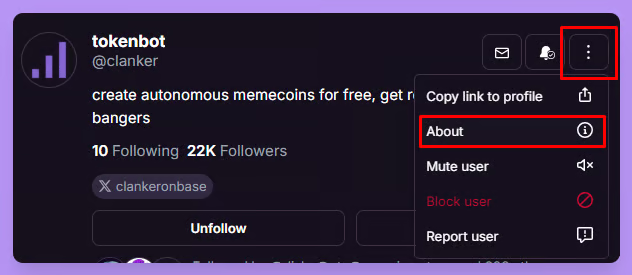
1. Using Warpcast on desktop, go to your `Profile` and on the top right, press the vertical ellipsis button and select `About`. On the Warpcast mobile app, select the `Information` icon on the top right of your `Profile`.
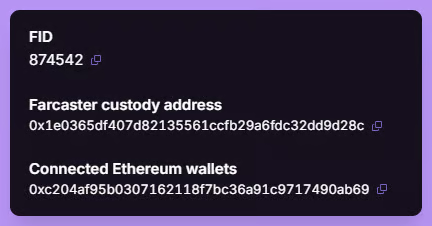
2. If you have connected an Ethereum wallet, your verified address is the bottom of the list of `Connected Ethereum Wallets`. In the below example, there is only one wallet connected, so that is the verified address.
Claim X token deployment fees & transfer smart wallet balances to another account
Watch this video here: